import random
Lecture 3: Data analysis ecosystem
Language + Dataframes + Viz
In this lecture, we’ll simulate Sanger sequencing using Python. Along the way, we’ll learn fundamental programming concepts—each biological step maps to a programming technique: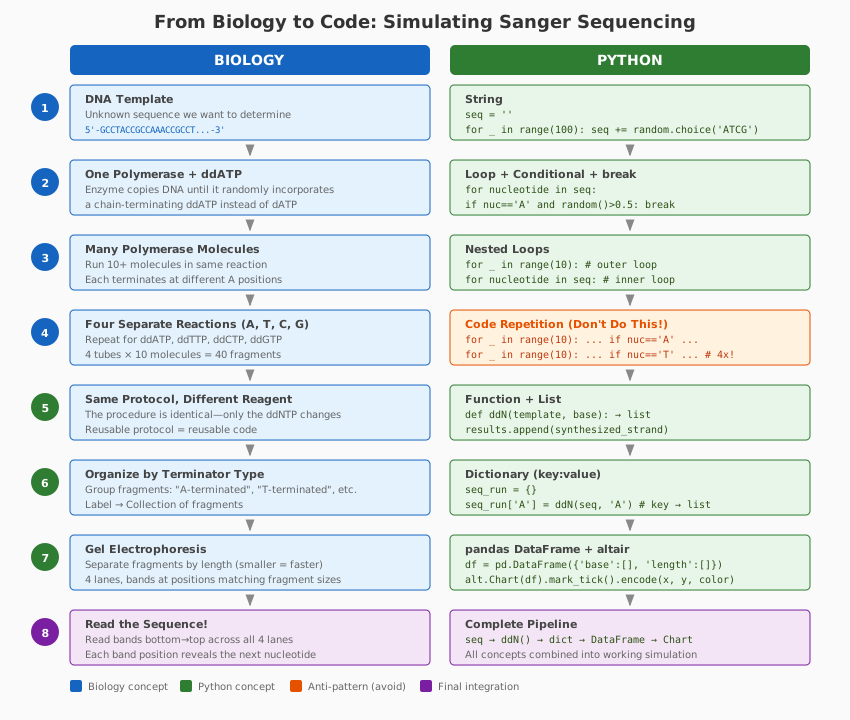
First we import a module called random which contains a number of functions for generating and working with random numbers
Generate a random sequence
Next, we will write a simple loop that generates a sequence of a preset length:
seq = ''
for _ in range(100):
seq += random.choice('ATCG')seq'GCCTACCGCCAAACCGCCTCCAGTGTTACAAATCAGGACTTCGCTTAGTACAGCTCTGTAGGCGTGTCAAGTCAACAGACTGAGTAGTCGAGGTCTTAGT'Simulate one polymerase molecule
The code below iterates through each nucleotide in seq. When it encounters an ‘A’, it generates a random number between 0 and 1 using random.random(). If this number is smaller or equal than 0.5, the polymerase “terminates”—it adds a lowercase ‘a’ (representing incorporation of a ddNTP) to synthesized_strand and stops synthesis by breaking out of the loop. If the random number is greater than 0.5, synthesis continues normally.
For all other nucleotides (and for ‘A’ when synthesis continues), the uppercase nucleotide is added to synthesized_strand.
This simulates Sanger sequencing, where ddNTPs randomly terminate DNA synthesis at positions matching a specific base.
synthesized_strand = ''

for nucleotide in seq:
    if nucleotide == 'A':
        d_or_dd = random.random()
        if d_or_dd > 0.5:
            None
        else:
            synthesized_strand += 'a'
            break
    synthesized_strand += nucleotide
This can be simplified by first removing d_or_dd variable:
synthesized_strand = ''
for nucleotide in seq:
    if nucleotide == 'A':
        if random.random() > 0.5:
            None
        else:
            synthesized_strand += 'a'
            break
    synthesized_strand += nucleotide
print(synthesized_strand)GCCTACCGCCAaand removing unnecessary group of if ... else statements:
synthesized_strand = ''
for nucleotide in seq:
    if nucleotide == 'A' and random.random() > 0.5:
        synthesized_strand += 'a'
        break
    synthesized_strand += nucleotide
print(synthesized_strand)GCCTACCGCCafinally let’s make synthesized_strand += 'a' a bit more generic:
synthesized_strand = ''
for nucleotide in seq:
    if nucleotide == 'A' and random.random() > 0.5:
        synthesized_strand += nucleotide.lower()
        break
    synthesized_strand += nucleotide
print(synthesized_strand)GCCTACCGCCaSimulating multiple molecules
To simulate 10 polymerase molecules, we simply wrap the code from above into a for loop:
for _ in range(10):
    synthesized_strand = ''
    for nucleotide in seq:
        if nucleotide == 'A' and random.random() > 0.5:
            synthesized_strand += nucleotide.lower()
            break
        synthesized_strand += nucleotide
    print(synthesized_strand)
GCCTACCGCCa
GCCTACCGCCAAa
GCCTACCGCCAa
GCCTa
GCCTa
GCCTa
GCCTa
GCCTa
GCCTACCGCCAa
GCCTaOne problem with this code is that it does not actually save the newly synthesized strand: it simply prints it. To fix this we will create a list (or an array) called new_strands and initialize it by assigning an empty list to it:
new_strands = []
for _ in range(10):
    synthesized_strand = ''
    for nucleotide in seq:
        if nucleotide == 'A' and random.random() > 0.5:
            synthesized_strand += nucleotide.lower()
            break
        synthesized_strand += nucleotide
new_strands.append(synthesized_strand)new_strands['GCCTa',
'GCCTa',
'GCCTACCGCCAAa',
'GCCTa',
'GCCTa',
'GCCTa',
'GCCTa',
'GCCTACCGCCa',
'GCCTa',
'GCCTACCGCCa']Simulating multiple molecules and all nucleotides
And to repeat this for the remaining three nucleotides we will do the following crazy thing:
new_strands = []
for _ in range(10):
    synthesized_strand = ''
    for nucleotide in seq:
        if nucleotide == 'A' and random.random() > 0.5:
            synthesized_strand += nucleotide.lower()
            break
        synthesized_strand += nucleotide
    new_strands.append(synthesized_strand)

for _ in range(10):
    synthesized_strand = ''
    for nucleotide in seq:
        if nucleotide == 'C' and random.random() > 0.5:
            synthesized_strand += nucleotide.lower()
            break
        synthesized_strand += nucleotide
    new_strands.append(synthesized_strand)

for _ in range(10):
    synthesized_strand = ''
    for nucleotide in seq:
        if nucleotide == 'G' and random.random() > 0.5:
            synthesized_strand += nucleotide.lower()
            break
        synthesized_strand += nucleotide
    new_strands.append(synthesized_strand)

for _ in range(10):
    synthesized_strand = ''
    for nucleotide in seq:
        if nucleotide == 'T' and random.random() > 0.5:
            synthesized_strand += nucleotide.lower()
            break
        synthesized_strand += nucleotide
new_strands.append(synthesized_strand)len(new_strands)40Repeating the same code four times is just plain stupid, so instead we will write a function called ddN. Here we need to understand the scope of variables. The scope of a variable refers to the regions of the code where the variable can be accessed or modified. Variables that are defined within a certain block of code (such as a function) are said to have a local scope, meaning that they can only be accessed within that block of code. Variables that are defined outside of any function are said to have a global scope, meaning that they can be accessed from anywhere in the code.
In most programming languages, a variable defined within a function has a local scope and can only be accessed within that function. If a variable with the same name is defined outside the function, it will have a global scope. However, if a variable with the same name is defined within the function, it will take precedence over the global variable.
In Python, variables defined in the main module have global scope and can be accessed from any function or module. Variables defined within a function have local scope and can only be accessed within that function. Unlike some other languages (like C++ or Java), Python does NOT have block scope—variables defined within a loop or if statement remain accessible after the block ends.
def ddN(number_of_iterations, template, base, ddN_ratio):
    new_strands = []
    for _ in range(number_of_iterations):
        synthesized_strand = ''
        for nucleotide in template:
            if nucleotide == base and random.random() > ddN_ratio:
                synthesized_strand += nucleotide.lower()
                break
            synthesized_strand += nucleotide
        new_strands.append(synthesized_strand)
return(new_strands)ddN(10,seq,'A',0.5)['GCCTa',
'GCCTa',
'GCCTACCGCCAa',
'GCCTACCGCCAa',
'GCCTa',
'GCCTa',
'GCCTa',
'GCCTACCGCCAa',
'GCCTACCGCCa',
'GCCTACCGCCa']To execute this function on all four types of ddNTPs, we need to wrap it in a for loop iterating over the four possibilities:
for nt in 'ATCG':
    ddN(10,seq,nt,0.5)
A bit about lists
To store the sequences being generated in the previous loop we will create and initialize a list called seq_run:
seq_run = []
for nt in 'ATCG':
    seq_run.append(ddN(10,seq,nt,0.5))
you will see that the seq run is a two-dimensional list:
seq_run[['GCCTa',
'GCCTa',
'GCCTACCGCCAa',
'GCCTa',
'GCCTa',
'GCCTa',
'GCCTa',
'GCCTACCGCCAAACCGCCTCCAGTGTTACAAa',
'GCCTa',
'GCCTa'],
['GCCt',
'GCCt',
'GCCTACCGCCAAACCGCCt',
'GCCTACCGCCAAACCGCCTCCAGTGt',
'GCCTACCGCCAAACCGCCt',
'GCCTACCGCCAAACCGCCTCCAGTGTt',
'GCCt',
'GCCTACCGCCAAACCGCCTCCAGt',
'GCCTACCGCCAAACCGCCTCCAGt',
'GCCt'],
['Gc',
'Gc',
'Gc',
'GCCTACCGCc',
'GCCTAc',
'GCCTAc',
'GCCTACc',
'GCc',
'GCc',
'GCCTACCGCCAAAc'],
['GCCTACCg',
'GCCTACCg',
'GCCTACCGCCAAACCg',
'g',
'g',
'GCCTACCGCCAAACCg',
'g',
'g',
'g',
'GCCTACCg']]as you will read in your next home assignment list elements can be addressed by “index”. The first element has number 0:
seq_run[0]['GCCTa',
'GCCTa',
'GCCTACCGCCAa',
'GCCTa',
'GCCTa',
'GCCTa',
'GCCTa',
'GCCTACCGCCAAACCGCCTCCAGTGTTACAAa',
'GCCTa',
'GCCTa']A bit about dictionaries
Another way to store these data is in a dictionary, which is a collection of key:value pairs where a key and value can be anything:
seq_run = {}
for nt in 'ATCG':
seq_run[nt] = ddN(10,seq,nt,0.90)seq_run{'A': ['GCCTACCGCCAAACCGCCTCCAGTGTTa',
'GCCTACCGCCAAACCGCCTCCAGTGTTACAAa',
'GCCTa',
'GCCTACCGCCAAACCGCCTCCAGTGTTACAAATCAGGACTTCGCTTAGTACAGCTCTGTAGGCGTGTCAAGTCAa',
'GCCTACCGCCAAACCGCCTCCAGTGTTACAAATCAGGACTTCGCTTAGTACAGCTCTGTAGGCGTGTCAAGTCAACAGACTGAGTAGTCGAGGTCTTAGT',
'GCCTACCGCCAa',
'GCCTa',
'GCCTACCGCCAAACCGCCTCCAGTGTTACAAATCAGGACTTCGCTTAGTACAGCTCTGTAGGCGTGTCAAGTCAACAGACTGAGTAGTCGAGGTCTTAGT',
'GCCTACCGCCAAACCGCCTCCAGTGTTACAAATCAGGACTTCGCTTAGTACAGCTCTGTAGGCGTGTCAAGTCa',
'GCCTACCGCCAAa'],
'T': ['GCCTACCGCCAAACCGCCTCCAGTGTTACAAATCAGGACTt',
'GCCTACCGCCAAACCGCCTCCAGTGTTACAAATCAGGACTt',
'GCCTACCGCCAAACCGCCTCCAGTGTTACAAATCAGGACTTCGCTTAGTACAGCt',
'GCCTACCGCCAAACCGCCTCCAGTGTTACAAATCAGGACTt',
'GCCTACCGCCAAACCGCCTCCAGTGTTACAAATCAGGACt',
'GCCTACCGCCAAACCGCCTCCAGt',
'GCCTACCGCCAAACCGCCTCCAGTGTTACAAATCAGGACTTCGCTTAGTACAGCTCTGTAGGCGTGTCAAGTCAACAGACTGAGTAGTCGAGGt',
'GCCTACCGCCAAACCGCCTCCAGTGt',
'GCCt',
'GCCTACCGCCAAACCGCCTCCAGt'],
'C': ['GCCTACCGCCAAACCGCCTCCAGTGTTAc',
'GCCTACCGCCAAACc',
'GCCTACCGCCAAAc',
'GCCTACCGCCAAAc',
'GCCTACCGCc',
'GCCTACCGCCAAAc',
'GCCTACCGCCAAACCGc',
'GCc',
'GCCTACCGCc',
'GCc'],
'G': ['GCCTACCGCCAAACCGCCTCCAGTGTTACAAATCAGGACTTCGCTTAGTACAGCTCTGTAGGCGTGTCAAGTCAACAg',
'GCCTACCGCCAAACCGCCTCCAGTGTTACAAATCAGGACTTCg',
'GCCTACCGCCAAACCGCCTCCAGTGTTACAAATCAGGACTTCGCTTAGTACAg',
'GCCTACCGCCAAACCGCCTCCAGTGTTACAAATCAGGACTTCGCTTAGTACAGCTCTGTAGGCGTGTCAAGTCAACAg',
'GCCTACCGCCAAACCGCCTCCAGTGTTACAAATCAGg',
'GCCTACCGCCAAACCGCCTCCAg',
'GCCTACCGCCAAACCGCCTCCAGTGTTACAAATCAGGACTTCGCTTAGTACAg',
'GCCTACCGCCAAACCGCCTCCAGTGTTACAAATCAGGACTTCg',
'GCCTACCGCCAAACCGCCTCCAGTGTTACAAATCAGGACTTCGCTTAGTACAGCTCTGTAGGCGTGTCAAGTCAACAGACTGAGTAGTCGAGg',
'GCCTACCg']}dictionary elements can be retrieved using a key:
seq_run['A']['GCCTACCGCCAAACCGCCTCCAGTGTTa',
'GCCTACCGCCAAACCGCCTCCAGTGTTACAAa',
'GCCTa',
'GCCTACCGCCAAACCGCCTCCAGTGTTACAAATCAGGACTTCGCTTAGTACAGCTCTGTAGGCGTGTCAAGTCAa',
'GCCTACCGCCAAACCGCCTCCAGTGTTACAAATCAGGACTTCGCTTAGTACAGCTCTGTAGGCGTGTCAAGTCAACAGACTGAGTAGTCGAGGTCTTAGT',
'GCCTACCGCCAa',
'GCCTa',
'GCCTACCGCCAAACCGCCTCCAGTGTTACAAATCAGGACTTCGCTTAGTACAGCTCTGTAGGCGTGTCAAGTCAACAGACTGAGTAGTCGAGGTCTTAGT',
'GCCTACCGCCAAACCGCCTCCAGTGTTACAAATCAGGACTTCGCTTAGTACAGCTCTGTAGGCGTGTCAAGTCa',
'GCCTACCGCCAAa']Drawing a sequencing gel
Now that we can simulate and store newly synthesized sequencing strands terminated with ddNTPs, let us try to draw a realistic representation of the sequencing gel. For this we will use several components that will be discussed in much greater detail in the upcoming lectures. These components are:
pandas- a dataframe manipulation toolaltair- a statistical visualization library built on top of thevega-litevisualization grammar
These two libraries will be used in almost all lectures concerning Python in this class.
Gel electrophoresis separates molecules based on mass, shape, or charge. In the case of DNA, all molecules are universally negatively charged and thus will always migrate toward the (+) electrode. All our molecules are linear single-stranded pieces (our gel is denaturing), and so the only physical/chemical characteristic that distinguishes them is length. Therefore, the first thing we will do is convert our sequences into their lengths. For this we will initialize a new dictionary called seq_lengths:
seq_lengths = {'base':[],'length':[]}
for key in seq_run.keys():
    for sequence in seq_run[key]:
        seq_lengths['base'].append(key)
seq_lengths['length'].append(len(sequence))seq_lengths{'base': ['A',
'A',
'A',
'A',
'A',
'A',
'A',
'A',
'A',
'A',
'T',
'T',
'T',
'T',
'T',
'T',
'T',
'T',
'T',
'T',
'C',
'C',
'C',
'C',
'C',
'C',
'C',
'C',
'C',
'C',
'G',
'G',
'G',
'G',
'G',
'G',
'G',
'G',
'G',
'G'],
'length': [28,
32,
5,
75,
100,
12,
5,
100,
74,
13,
41,
41,
55,
41,
40,
24,
94,
26,
4,
24,
29,
15,
14,
14,
10,
14,
17,
3,
10,
3,
78,
43,
53,
78,
37,
23,
53,
43,
93,
8]}now let’s import pandas:
import pandas as pdand inject seq_lengths into a pandas dataframe:
sequences = pd.DataFrame(seq_lengths)it looks pretty:
sequences| base | length | |
|---|---|---|
| 0 | A | 28 |
| 1 | A | 32 |
| 2 | A | 5 |
| 3 | A | 75 |
| 4 | A | 100 |
| 5 | A | 12 |
| 6 | A | 5 |
| 7 | A | 100 |
| 8 | A | 74 |
| 9 | A | 13 |
| 10 | T | 41 |
| 11 | T | 41 |
| 12 | T | 55 |
| 13 | T | 41 |
| 14 | T | 40 |
| 15 | T | 24 |
| 16 | T | 94 |
| 17 | T | 26 |
| 18 | T | 4 |
| 19 | T | 24 |
| 20 | C | 29 |
| 21 | C | 15 |
| 22 | C | 14 |
| 23 | C | 14 |
| 24 | C | 10 |
| 25 | C | 14 |
| 26 | C | 17 |
| 27 | C | 3 |
| 28 | C | 10 |
| 29 | C | 3 |
| 30 | G | 78 |
| 31 | G | 43 |
| 32 | G | 53 |
| 33 | G | 78 |
| 34 | G | 37 |
| 35 | G | 23 |
| 36 | G | 53 |
| 37 | G | 43 |
| 38 | G | 93 |
| 39 | G | 8 |
In our data there is a number of DNA fragments that have identical length (just look at the dataframe above). We can condense these by grouping dataframe entries first by nucleotide (['base']) and then by length (['length']). For each group we will then compute count and put it into a new column named, unsurprisngly, count:
sequences_grouped_by_length = sequences.groupby(
    ['base','length']
).agg(
    count=pd.NamedAgg(
        column='length',
        aggfunc='count'
    )
).reset_index()sequences_grouped_by_length| base | length | count | |
|---|---|---|---|
| 0 | A | 5 | 2 |
| 1 | A | 12 | 1 |
| 2 | A | 13 | 1 |
| 3 | A | 28 | 1 |
| 4 | A | 32 | 1 |
| 5 | A | 74 | 1 |
| 6 | A | 75 | 1 |
| 7 | A | 100 | 2 |
| 8 | C | 3 | 2 |
| 9 | C | 10 | 2 |
| 10 | C | 14 | 3 |
| 11 | C | 15 | 1 |
| 12 | C | 17 | 1 |
| 13 | C | 29 | 1 |
| 14 | G | 8 | 1 |
| 15 | G | 23 | 1 |
| 16 | G | 37 | 1 |
| 17 | G | 43 | 2 |
| 18 | G | 53 | 2 |
| 19 | G | 78 | 2 |
| 20 | G | 93 | 1 |
| 21 | T | 4 | 1 |
| 22 | T | 24 | 2 |
| 23 | T | 26 | 1 |
| 24 | T | 40 | 1 |
| 25 | T | 41 | 3 |
| 26 | T | 55 | 1 |
| 27 | T | 94 | 1 |
The following chart is created using the alt.Chart() function and passing the data as an argument. The mark_tick() function is used to create a tick chart with a thickness of 4 pixels.
The chart is encoded with two main axis:
- y-axis which represents the length of the data and it is encoded by the
'length'field of the data. - x-axis which represents the base of the data and it is encoded by the
'base'field of the data. The chart also encodes a color, it encodes the'count'field of the data and it sets the legend toNoneand it uses the'greys'scale from the Altair library.
Finally, the chart properties are set to a width of 100 pixels and a height of 800 pixels.
import altair as alt
alt.Chart(sequences_grouped_by_length).mark_tick(thickness=4).encode(
    y = alt.Y('length:Q'),
    x = alt.X('base'),
    color=alt.Color('count:Q',legend=None,
                    scale=alt.Scale(scheme="greys"))
).properties(
    width=100,
    height=800)
And here is a color version of the same graph using just one line of the gel:
import altair as alt
alt.Chart(sequences_grouped_by_length).mark_tick(thickness=4).encode(
    y = alt.Y('length:Q'),
    color=alt.Color('base:N',#legend=None,
                    scale=alt.Scale(scheme="set1"))
).properties(
    width=20,
    height=800)
# Generate random sequences
seq = ''
for _ in range(300):
seq += random.choice('ATCG')Putting everything together
seq'TTTCGACCGAGTGGACTTCGTGTACAGAGCAAAACCAGCTGAGGACGCGTGAACCCACTGCCCGTGTGCGCGCGGTCTTCACACATAAATTGCTGAGATCCTTGCACCCCGGTATGACCAGCGTCCCACGTGCCTGTCATACTATAATGTGTATAGAATTTACAGTGGCATAAGCTATCCAGACAAGTGCCGTCGCATTCCACCTGCACGGGTTATGTCCATGGTTATATTCCAAGAAAAGATGATGGAACATATTGGACACAATGTGATTGAGTCCTTCCTGGGCGAAGGTGTTCTATG'# Function simulating a single run of a single polymerase molecule
def ddN(number_of_iterations, template, base, ddN_ratio):
new_strands = []
for _ in range(number_of_iterations):
synthesized_strand = ''
for nucleotide in template:
if nucleotide == base and random.random() > ddN_ratio:
synthesized_strand += nucleotide.lower()
break
synthesized_strand += nucleotide
new_strands.append(synthesized_strand)
return(new_strands)# Generating simulated sequencing run
seq_run = {}
for nt in 'ATCG':
seq_run[nt] = ddN(100000,seq,nt,0.95)# Computing lengths
seq_lengths = {'base':[],'length':[]}
for key in seq_run.keys():
for sequence in seq_run[key]:
seq_lengths['base'].append(key)
seq_lengths['length'].append(len(sequence))# Converting dictionary into Pandas dataframe
sequences = pd.DataFrame(seq_lengths)# Grouping by nucleotide and length
sequences_grouped_by_length = sequences.groupby(
['base','length']
).agg(
count=pd.NamedAgg(
column='length',
aggfunc='count'
)
).reset_index()# Plotting (note the quadratic scale for realism)
import altair as alt
alt.Chart(sequences_grouped_by_length).mark_tick(thickness=4).encode(
y = alt.Y('length:Q',scale=alt.Scale(type='sqrt')),
x = alt.X('base'),
color=alt.Color('count:Q',legend=None,
scale=alt.Scale(type='log',scheme="greys")),
tooltip='count:Q'
).properties(
width=100,
height=800)# Plotting using color
import altair as alt
alt.Chart(sequences_grouped_by_length).mark_tick(thickness=4).encode(
y = alt.Y('length:Q',scale=alt.Scale(type="sqrt")),
color=alt.Color('base:N',#legend=None,
scale=alt.Scale(scheme="set1")),
opacity=alt.Opacity('count:N',legend=None),
tooltip='count:Q'
).properties(
width=20,
height=800)